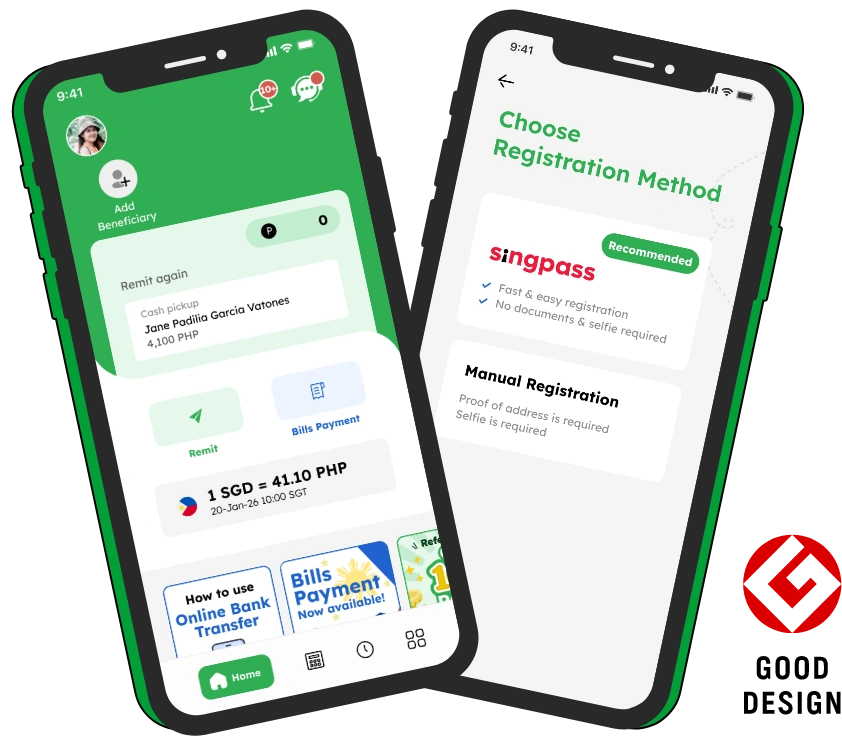




Registering for a Smiles account in Singapore is quick and easy. If you’re ready to send money from Singapore to the Philippines or Indonesia, completing your Smiles account registration is the first step.
This guide will walk you through the registration process step by step, explain what you’ll need before you begin, and share a few helpful tips to make your account verification as smooth as possible.
Why Register for a Smiles Account?
A Smiles account gives you access to a secure and convenient way to send money from Singapore while staying connected with the people who matter most.
With Smiles Mobile Remittance, you can:
- Send money from Singapore to the Philippines and Indonesia
- Transfer funds directly to supported bank accounts and e-wallets
- Enjoy competitive exchange rates and transparent fees
- Access additional financial services designed to make everyday life easier
Whether you’re supporting your family every month or sending money for a special occasion, Smiles helps make every transfer simple, reliable, and meaningful.
Related guides:
How to Send Money from Singapore to the Philippines
How to Send Money from Singapore to Indonesia
What You’ll Need Before Registering
Preparing everything in advance can help you complete your registration faster.
Before creating your Smiles account, make sure you have:
- A valid email address
- A Singapore mobile number
- A valid identification document such as an NRIC, FIN, Employment Pass, S Pass, Work Permit, or Passport (where applicable)
- A stable internet connection
- The latest version of the Smiles app installed on your smartphone
Having these ready will make the registration process smoother and help avoid unnecessary delays.
How to Register for a Smiles Account
- Step 1: Download the Smiles App
Download the Smiles Mobile Remittance app from the App Store or Google Play. Once the app is installed, open it and tap Create an Account to begin your registration. - Step 2: Enter Your Email Address
Enter your email address and create a secure password. Use an email address that you can access, as you’ll receive a verification email to activate your account. - Step 3: Verify Your Email
Open the verification email sent by Smiles and click the verification link. If you don’t receive the email within a few minutes, remember to check your spam or junk folder before requesting another one. - Step 4: Complete Your Personal Information
Fill in your personal details, including your name, nationality, residential address, and occupation. For a smoother verification process, ensure that all information matches your official identification documents. - Step 5: Verify Your Identity
To keep every account secure and comply with Singapore’s financial regulations, Smiles requires identity verification. Depending on your eligibility, you can complete verification using Singpass or by uploading your identification documents through the app. Follow the instructions carefully and make sure your document photos are clear and easy to read. - Step 6: Wait for Approval
After submitting your information, Smiles will review your registration. Many applications are approved within a short time, although verification may take longer if additional checks are required. Once your account has been verified, you’re ready to make your first money transfer with Smiles.
View Smiles Guidelines for more details
Tips for a Faster Registration
A few simple steps can help speed up your account approval.
- Double-check your personal information before submitting
- Upload clear and high-quality photos of your identification documents
- Make sure your email address and Singapore mobile number are active
- Complete your registration using a stable internet connection
- Follow all instructions carefully during the verification process
Preparing everything beforehand can help you avoid common registration delays.
You’re Ready to Share Smiles
Registering for a Smiles account is the first step toward supporting the people who matter most. Once your account is verified, you can send money from Singapore to the Philippines or Indonesia quickly, securely, and conveniently through the Smiles app.
At Smiles, every transfer is more than just sending money. It’s a way to stay connected, celebrate life’s meaningful moments, and show your care no matter the distance.
Looking for more helpful guides? Explore our articles on sending money from Singapore, exchange rate updates, and everyday life in Singapore. Wherever you are, Smiles is here to help you Share Smiles with your loved ones.
Today's rate
1 SGD = 49.2 PHP
2026 October 22, Thu 09:20Ready to send money overseas? Smiles makes sending money fast, safe, and convenient.